Entities
Entities are the core of your application. They allow you to connect to your database and perform CRUD operations on your data, they are the reperesentaion of a table/view in your database.
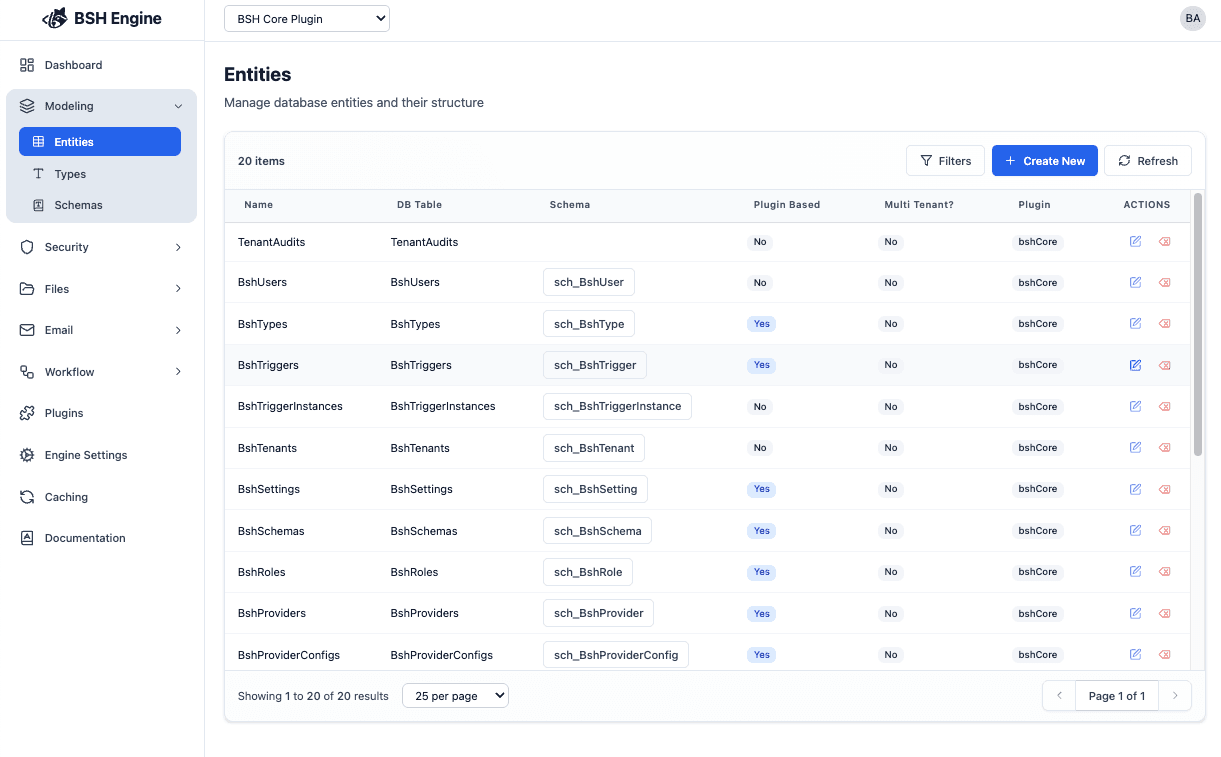
to manage your entities you can use the Entities page in the admin panel:
Create an Entity
to create an entity you can use the Create button in the Entities page, and you will get a form to fill the entity details:
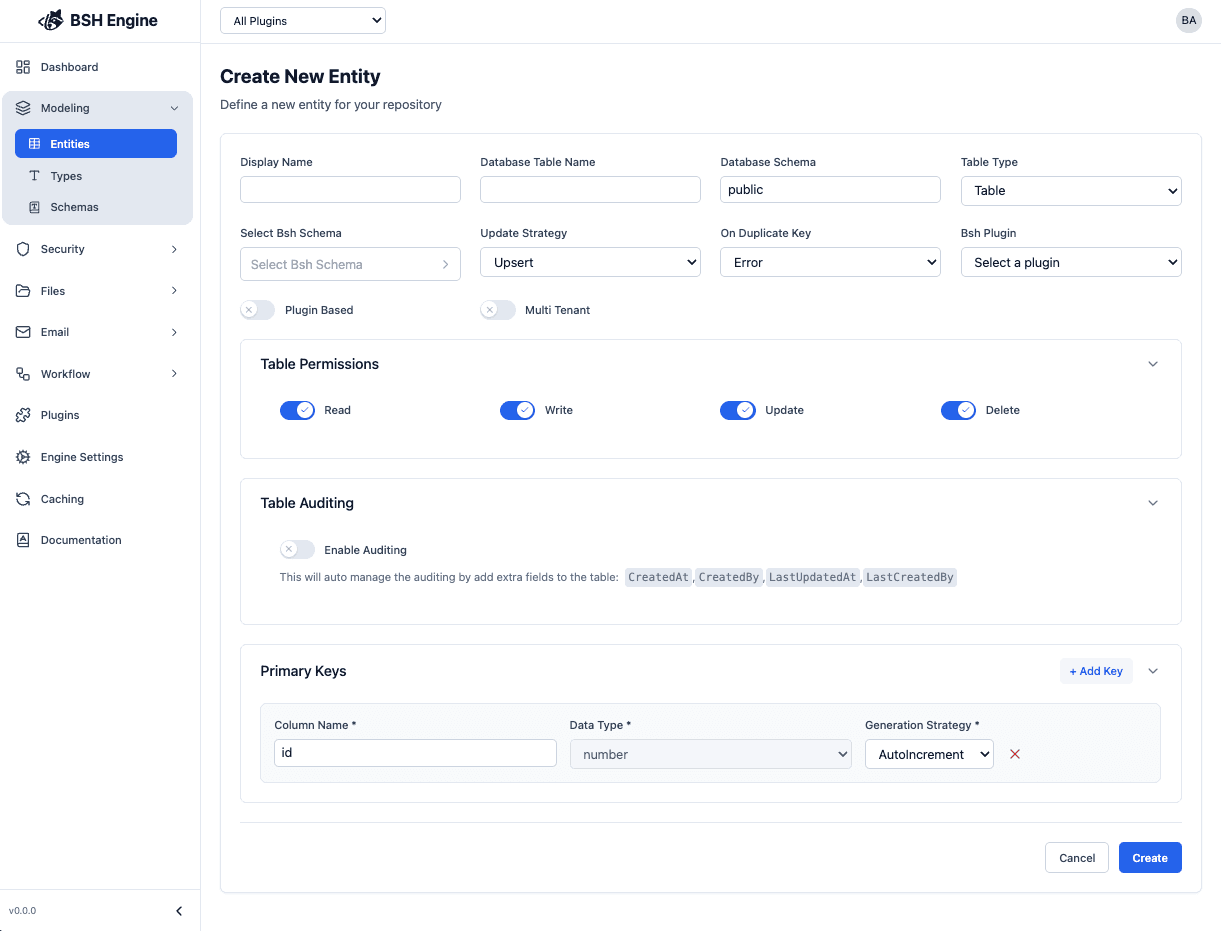
Entity Details
| Field | Description | required | default |
|---|---|---|---|
| Display Name | The name of the entity (will used as a reference to the entity) | yes | ~ |
| Database Table Name | is the table name in the database | yes | ~ |
| Database Schema | The database schema where the table is located | no | public |
| Table Type | The type of the table (table/view/function) | no | table |
| Bsh Schema | The schema of the entity in the Bsh Engine | no | ~ |
| Data Source | The data source of the entity (database connection) | no | ~ |
| Update Strategy | The behavior of the entity when the data is updated (do we want to perform and Upsert or Replace operation) | no | Upsert |
| On Duplicate Key | What should we do if Primary Key is duplicated when trying to insert a new row? (do we want to perform and Update or throwing an Error) | no | Error |
| Plugin | The plugin name to use for the entity | no | ~ |
The same page is used to create and edit an entity.
Table type of function is not supported yet, but it will be in the future releases.
Data source are not supported yet. It is a feature that allows the engine to connect to multiple databases.
Plugin are not supported yet. It is a feature that allows the engine to sperate your entities, types, etc into different plugins. The idea is to allow you to pacakge your application and install it in different environments.
Entity Permissions
Entity permissions allow you to control which operations can be performed on each entity, depending on its type. This helps ensure the appropriate data access and security within your application.
You can configure permissions for every entity through the Entity Permissions section in the admin panel:

| Permission | Description | Table | View | Function |
|---|---|---|---|---|
| Read | Allows reading data from the entity. | ✅ | ✅ | ✅ |
| Write | Allows inserting new data into the entity. | ✅ | ❌ | ❌ |
| Update | Allows modifying existing data in the entity. | ✅ | ❌ | ❌ |
| Delete | Allows removing data from the entity. | ✅ | ❌ | ❌ |
- For entities backed by tables, all permission types (
Read,Write,Update,Delete) are enabled by default. - For views and functions, only the
Readoperation is permitted by default—other operations are restricted for safety and consistency.
You can tailor these permissions to match your application’s needs, ensuring users and services can perform only the allowed actions on each entity.
Entity Auditing

Entity auditing allows you to track changes made to your entities over time. When auditing is enabled for an entity, the system will automatically add and manage the following standard audit fields: CreatedAt, CreatedBy, LastUpdatedAt, and LastUpdatedBy. These fields help you identify who made changes and when those changes occurred.
By default, auditing is turned off for new entities. If you want to track modification history, simply enable this option when creating or editing the entity.
Primary Keys

A primary key is a column, or a set of columns, that uniquely identifies each row within an entity (table). Setting a primary key is essential for ensuring data consistency, efficient lookups, and integrity—each row should be distinguishable from every other row by its primary key value.
Note: If you don’t specify a primary key, the entity will not enforce row uniqueness, which may lead to duplicated data or issues referencing individual rows. It is strongly recommended to define a primary key when creating or editing your entity.
How to Configure Primary Keys
When creating or editing an entity, you can define the primary key(s) in the configuration interface. Typically, you’ll need to provide the following information:
| Field | Description | Required |
|---|---|---|
| Column Name | The column(s) to use as the primary key. (You can choose one or more columns for composite keys.) | Yes |
| Data Type | The data type for the primary key column(s), such as integer, string, etc. | Yes |
| Generation Strategy | How the primary key values are generated. Supported strategies: AutoIncrement, UUID, or Fixed. | Yes |
AutoIncrement: Generates a sequential unique number for each new row. Useful for numeric primary keys.
UUID: Generates a Universally Unique Identifier for each row. Preferred when you need a globally unique value.
Fixed: You manually supply the primary key value for each row when inserting data. Suitable for cases where keys come from external sources or require custom logic.
If you select Fixed as the generation strategy, you must supply a unique value for the primary key when inserting new rows. If you do not provide a value, or if a duplicate value is used, an error will be thrown.
BSH Engine allows you to use composite primary keys, which means you can use multiple columns as the primary key.
Multi Tenant Entities
Entities can be configured to be multi-tenant, which means that the records are associated with a tenant. so users can only access data which is associated with their tenant.
To configure an entity to be multi-tenant, you can use the Multi Tenant checkbox in the entity form.
When a entity is multi-tenant, the engine will add a tenantId column to the entity as a primary key.
