Triggers
Triggers are listeners that watch for changes on your entities and execute custom logic when those changes occur. They enable you to automatically respond to data modifications in your application by configuring actions that execute when specific events happen, such as the creation, update, or deletion of records.
Triggers provide a flexible way to enforce business logic, automate workflows, or integrate with external services without manual intervention.
Docs
Creating a Trigger
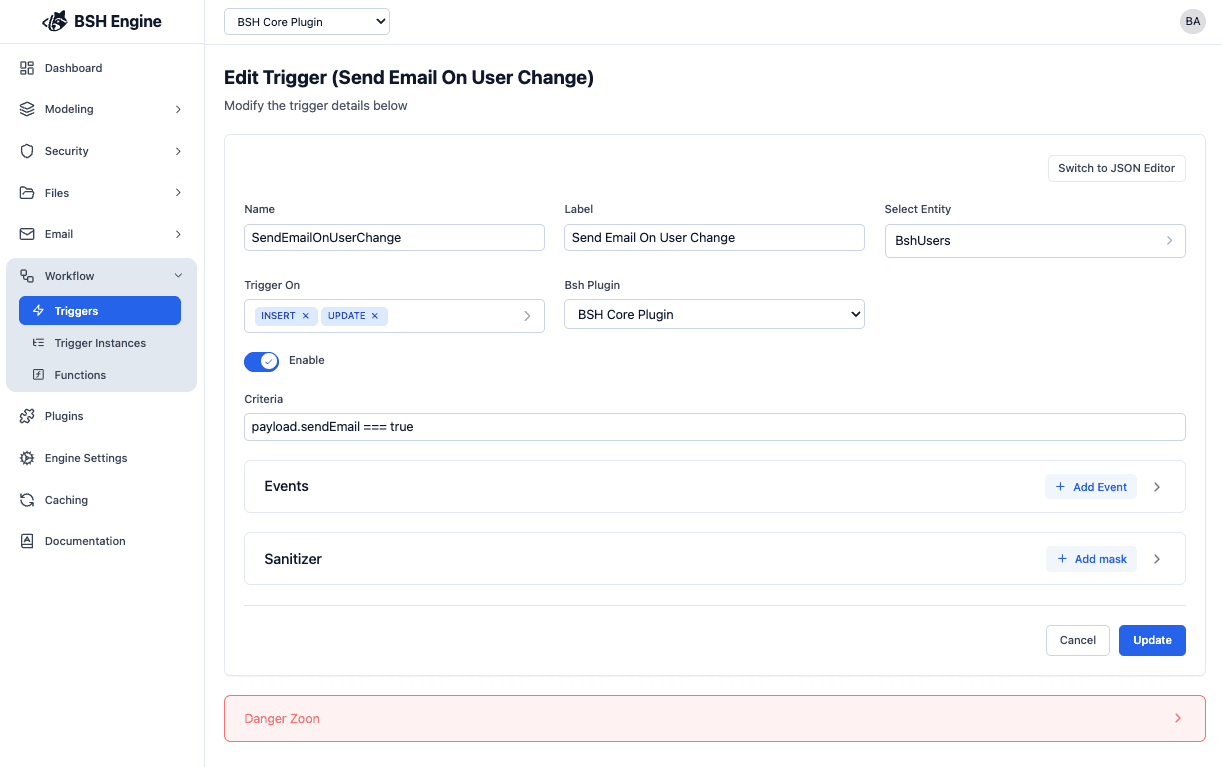
| Field | Description |
|---|---|
| Name | The unique identifier for the trigger. |
| Label | A human-readable name for the trigger. |
| Entity | The entity to monitor for changes. |
| Trigger On | The event type that activates the trigger: Insert, Update, or Delete. |
| Enabled | Whether the trigger is currently active. |
| Criteria | Conditions that must be met for the trigger to fire. |
| Events | Actions to execute when the trigger conditions are met. |
Trigger Events
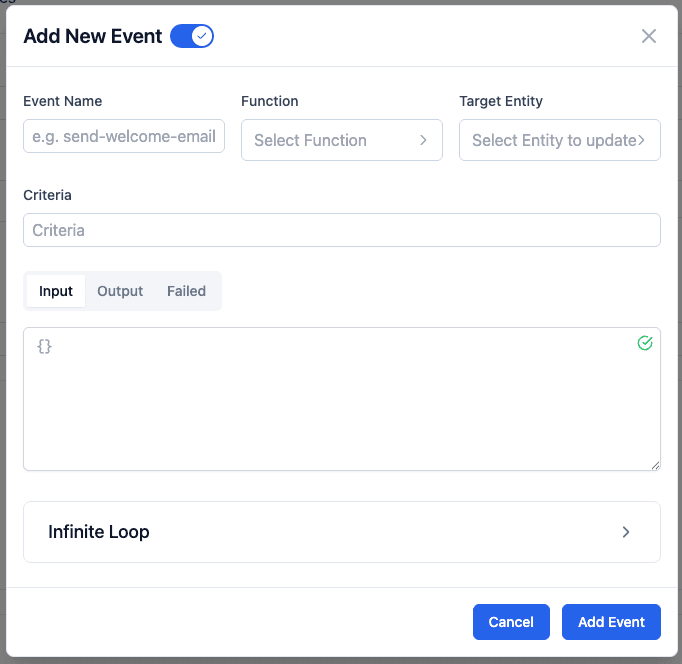
A Trigger can have multiple events, each of which can be configured independently.
Each event represents a specific action to execute when the trigger fires, such as calling a function, updating
related records, or integrating with external services.
| Event | Description |
|---|---|
| Name | The identifier for the event. |
| Function | The function to execute when the event is triggered. |
| Enabled | Whether this specific event is active. |
| Target Entity | The entity that the event will update. |
| Criteria | Additional conditions specific to this event. |
| Input | Input parameters passed to the function. |
| Output | Output configuration for the function result. |
| Failed | Configuration for handling event failures. |
| infiniteLoop | Configuration to prevent infinite loop scenarios. |
Target Entity is used only when the event needs to perform update on an entity.
Criteria
Criteria are JavaScript expressions that determine whether a trigger or event should execute. You have access to the following variables in your criteria expressions:
const payload = {}  // The record that triggered the event
const entity = {}   // The BSH entity definition
const user = {      // The user triggered the event
    type: "User|ApiKey",
    userId: "string",
    email: "string",
    profile: {}
}
Criteria is a JavaScript expression that evaluates to a boolean value. For example: payload.status == 'NEW' or user.email.includes('@company.com')
Example:
// Check if status changed to active
payload.status == 'ACTIVE'

// Check if user is from a specific domain
user.email.endsWith('@company.com')

// Check if amount is above threshold
payload.amount > 1000

// Complex condition
payload.status == 'NEW' && user.type == 'User'
Event JSON Configurations
The input, output, and failed fields are JSON objects that allow you to customize the data flow through your trigger events. Here are the variables available in each context:
Input
The input JSON defines what data is passed to your trigger function.
{
    "payload": {},
    "entity": {},
    "user": {
        "type": "User|ApiKey",
        "userId": "string",
        "email": "string",
        "profile": {}
    }
}
Example:
{
    "recordId": "${payload.id}",
    "status": "${payload.status}",
    "triggeredBy": "${user.email}",
    "entityName": "${entity.name}"
}How to access the variable
You can access variables in JSON configurations using two methods:
String Interpolation: Use ${} to embed variable values directly
"recordId": "${payload.id}"JavaScript Expressions: Use $js() to execute JavaScript code
"total": "$js(payload.quantity * payload.price)",
"isValid": "$js(payload.amount > 0 && payload.status === 'PENDING')"
Infinite Loop Prevention
BSHEngine includes built-in protection against infinite loops that can occur when triggers create cascading updates.
The engine detects and prevents infinite loops using two mechanisms:
-
Payload Change Detection: The trigger stops executing if the payload hasn’t changed since the last execution.
-
Maximum Depth Limit: When a trigger repeatedly updates the same entity, the engine uses the
infiniteLoop.maxDeepsetting to limit how many times the trigger can execute before stopping.
Make sure all times to double check the trigger criteria and outputs to ensure they don’t create infinite loops.
If you’re experiencing issues with triggers stopping unexpectedly, check if you’ve created a circular trigger dependency. Adjust the maxDeep value carefully to balance protection with legitimate use cases.
Payload Sanitizer
The sanitizer is a built-in safety feature that lets you automatically remove or mask sensitive fields from the payload before any trigger log is recorded. This helps protect confidential data, such as user emails, credit card numbers, or authentication tokens, from being leaked to logs where they might be accessed by unauthorized users.
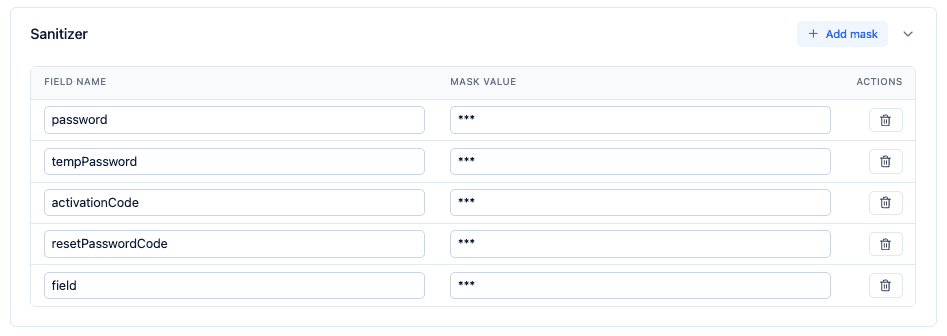
Set up the sanitizer in your trigger configuration by specifying which keys should be masked. Only non-sensitive fields will be stored in the logs, helping you stay compliant with internal security policies and privacy regulations.
Example use cases:
- Hiding fields like
password,apiKey, orssnin audit logs. - Obscuring personally identifiable information (PII) for compliance purposes.
- Ensuring log outputs are safe to be accessed by support or development teams.
Trigger Functions
Functions are built-in logical blocks that you can use to execute custom logic within your triggers. These functions provide pre-configured operations that can be called when trigger events fire.
For a complete list of available trigger functions and their parameters, refer to the Trigger Functions documentation.
Best Practices
- Be Specific with Criteria: Write precise criteria to avoid unnecessary trigger executions.
- Handle Failures Gracefully: Always configure the
failedJSON to capture and handle errors appropriately. - Avoid Circular Dependencies: Design your trigger logic to prevent one trigger from creating conditions that fire another trigger in a loop.
- Test Thoroughly: Test triggers with various scenarios before enabling them in production.
- Use Meaningful Names: Give triggers and events descriptive names that explain their purpose.
- Use Payload Sanitizer: Configure the sanitizer to mask sensitive fields from the payload before it is stored to the logs.
Common Use Cases
- Notifications: Send alerts when specific conditions are met
- Data Enrichment: Automatically populate related fields
- Workflow Automation: Trigger downstream processes based on data changes
- Integration: Sync data with external systems
- …
